
 | Previous Tutorial | Tutorial 1 | Next Tutorial |  |
| Getting Started With STM32 ARM Cortex MCUs | ||||
| STM32 Course Home Page ???? |
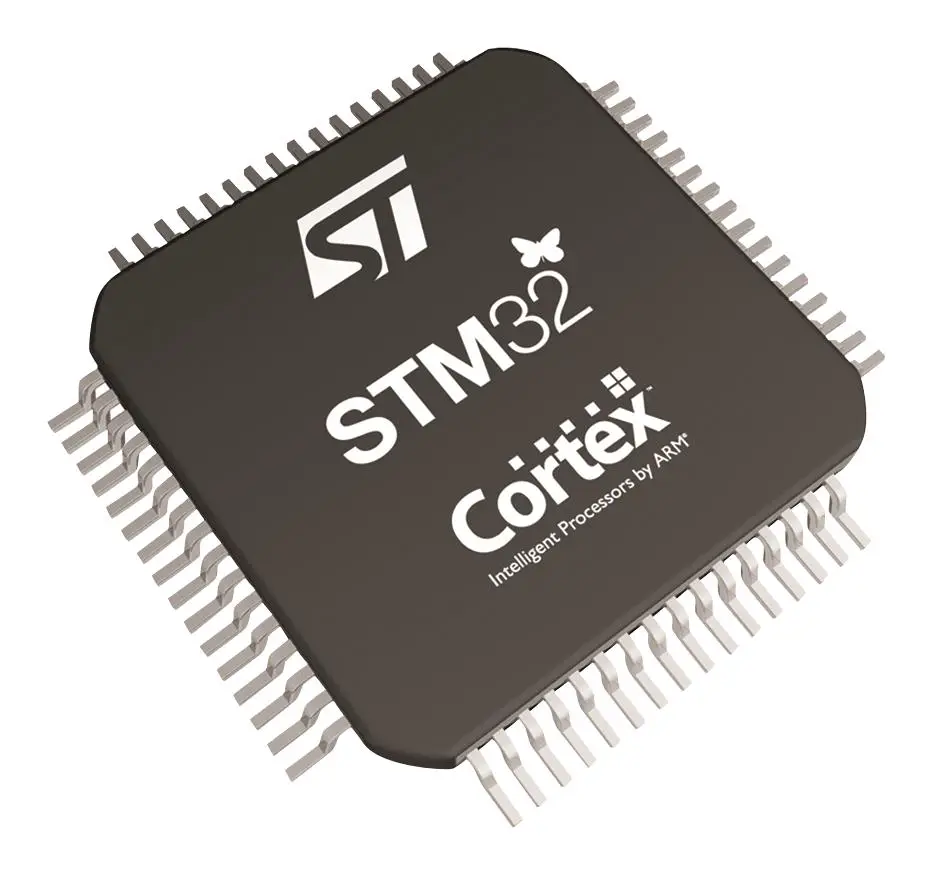
In this introductory tutorial, we’ll get a closer look at the STM32 ARM-Cortex based microcontrollers. And it’s internal architecture, bused, and features. We’ll discuss the reset and clock control circuitry with the clock tree, which we’ll configure later on using CubeMX.
The STM32 series of microcontrollers is one of the most popular ones among the 32-Bit microcontrollers. STMicroelectronics provides multiple of product lines for the STM32 parts. There is a low-power, mainstream, and high-performance product lines. And a more application-specific wide variety of parts that enables you to pick the right part for your project.
There are low-cost FullSpeed USB solutions, CAN, LIN, Ethernet, DCMI (Digital Camera Interface), and CryptoEngine for cryptographic applications, and much more powerful peripherals. Both digital and analog such as ADCs, DAC, OPamp, Comparators, etc.
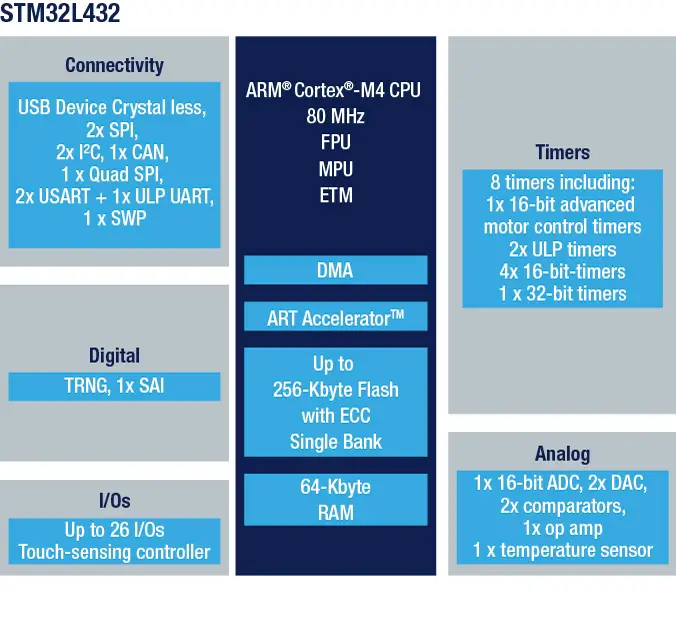
The development boards we’ve selected for this series of tutorials are Nucleo32-L432KC and Blue Pill. Here is the hardware peripherals and ARM-Core highlight diagram for the STM32L432KC microcontroller part.
You can use the STMicroelectronics software tool called “STM32 MCU Finder”. This is basically a parametric searching tool that helps you easily find the convenient microcontroller with the required specs that you select in the GUI tool.
In this series of tutorials, we’ll be using a couple of boards shown down below.
Nucleo32-L432KC
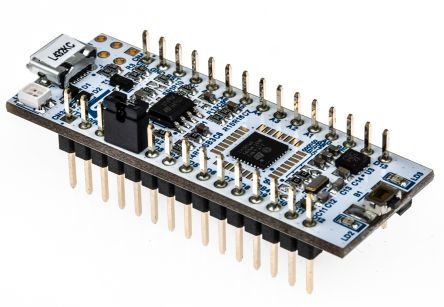
STM32L432KC Datasheet & Documents
Blue Pill STM32F103
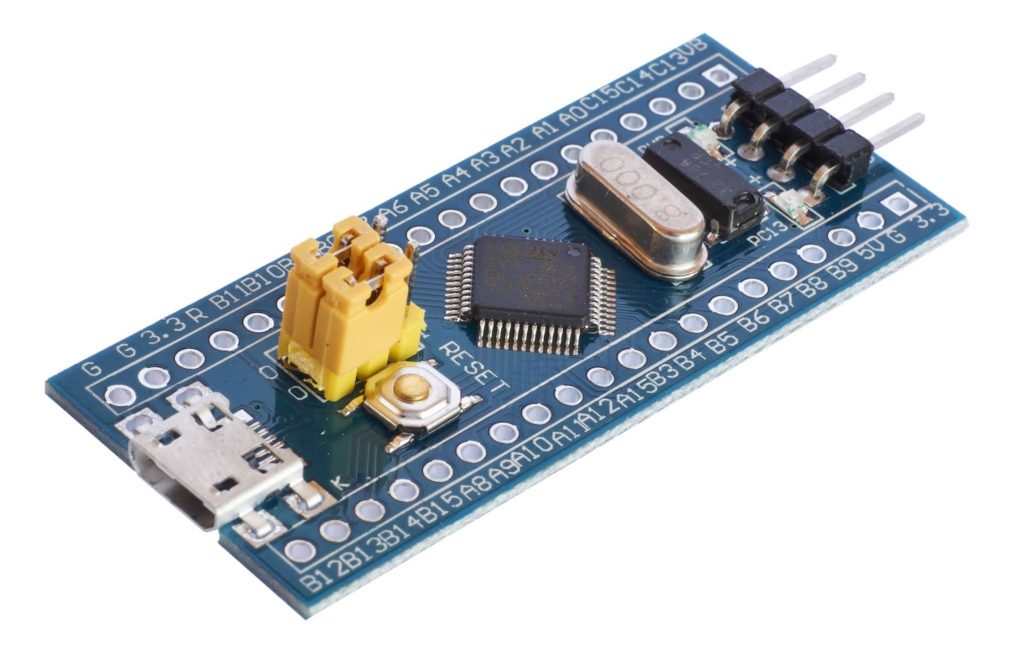
STM32F103C8T6 Datasheet & Documents
Arm® Cortex®-M4
The Arm® Cortex®-M4 with FPU processor is the latest generation of Arm® processors for embedded systems. It was developed to provide a low-cost platform that meets the needs of MCU implementation, with a reduced pin count and low-power consumption, while delivering outstanding computational performance and an advanced response to interrupts.
The Arm® Cortex®-M4 with FPU 32-bit RISC processor features exceptional code efficiency, delivering the high-performance expected from an Arm® core. The processor supports a set of DSP instructions that allow efficient signal processing and complex algorithm execution.
Its single precision FPU speeds up the software development process and accelerates the target performance. With its embedded Arm® core, the STM32L432KC microcontroller can be used in a wide range of applications. As we’ll see throughout the course.
The other STM32F103C8 microcontroller has a Cortex-M3 core that lacks the FPU and DSP operations which can be a huge miss in certain applications, however, it’s much cheaper target MCU at the end of the day.
Adaptive Real-Time (ART) Accelerator™
The ART Accelerator™ is a memory accelerator that is optimized for STM32 industry-standard Arm® Cortex® M4 processors. It balances the inherent performance advantage of the Arm® Cortex®-M4 over Flash memory technologies, which normally requires the processor to wait for the Flash memory at higher frequencies.
To release the processor near 100 DMIPS performance @ 80MHz, the accelerator implements an instruction prefetch queue and branch cache, which increases program execution speed from the 64-bit Flash memory. Based on the CoreMark benchmark, the performance achieved thanks to the ART accelerator is equivalent to 0 wait state program execution from Flash memory at a CPU frequency up to 80 MHz.
Memory protection unit (MPU)
The memory protection unit (MPU) is used to manage the CPU accesses to memory to prevent one task to accidentally corrupt the memory or resources used by any other active task. This memory area is organized into up to 8 protected areas that can in turn be divided up into 8 subareas.
The MPU is especially helpful for applications where some critical or certified code has to be protected against the misbehavior of other tasks. It is usually managed by an RTOS (realtime operating system). If a program accesses a memory location that is prohibited by the MPU, the RTOS can detect it and take action.
Firewall
The device embeds a Firewall that protects code sensitive and secure data from any access performed by a code executed outside of the protected areas. Each illegal access generates a reset which kills immediately the detected intrusion.
Boot modes
At startup, BOOT0 pin or nSWBOOT0 option bit, and BOOT1 option bit are used to select one of three boot options:
BOOT0 value may come from the PH3-BOOT0 pin or from an option bit depending on the value of a user option bit to free the GPIO pad if needed. A Flash empty check mechanism is implemented to force the boot from system flash if the first flash memory location is not programmed and if the boot selection is configured to boot from the main flash.
The boot-loader is located in system memory. It is used to reprogram the Flash memory by using USART, I2C, SPI or USB FS in Device mode through DFU (device firmware upgrade).
STM32L432KC (ARM Cortex-M4) Architecture
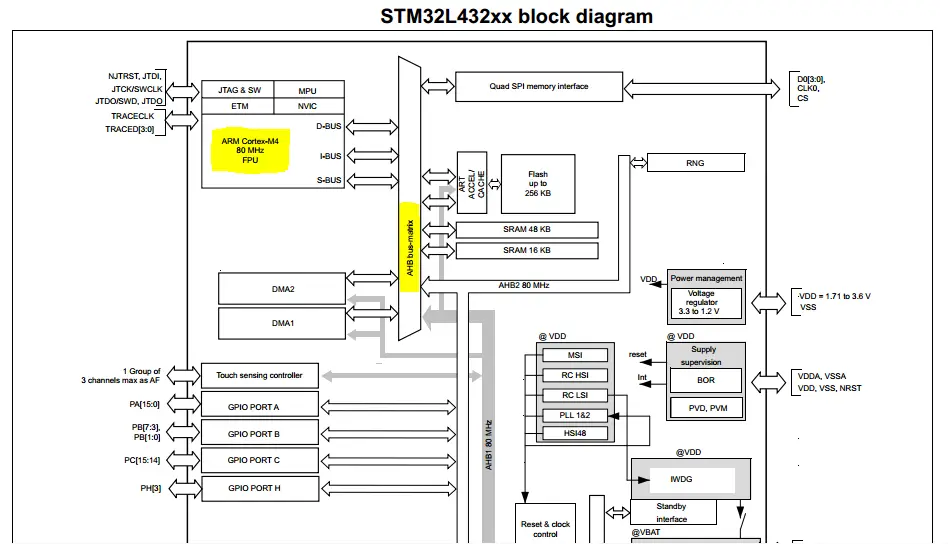
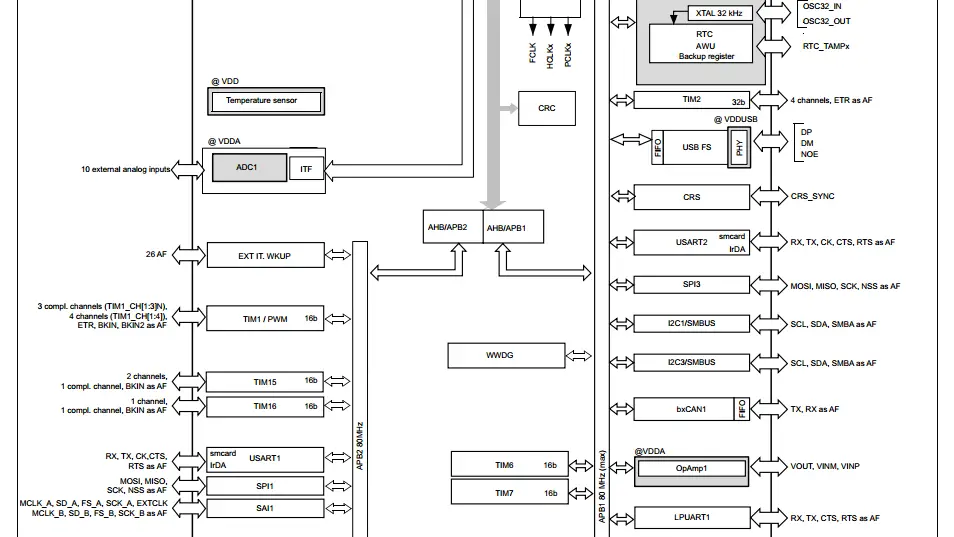
The system mainly consists of 32-Bit Multilayer AHB Bus Matrix (Highlighted in Yellow) that interconnects the following hardware components:
Five masters:
Seven slaves:
This bus matrix enables multiple masters on the bus to communicate with slaves concurrently. This accelerates the overall performance especially when DMA units are programmed.
The CPU can be doing some calculations and workload while the DMA1 unit is moving the data being received via SPI to SRAM1 memory space. All being done in the same time without CPU intervention or interrupts when every single byte is received.
Multilayer AHB Bus Matrix
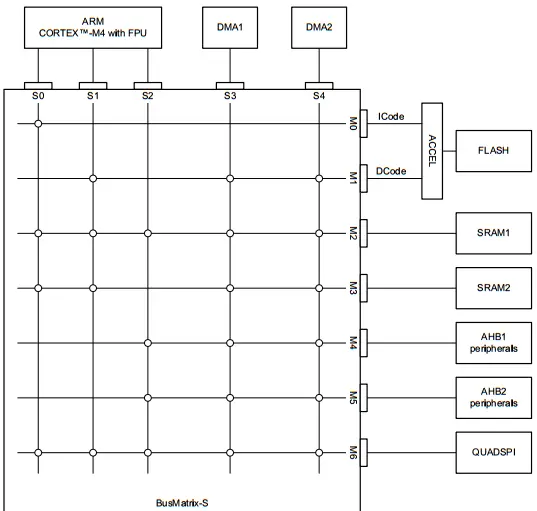
The BusMatrix manages the access arbitration between masters. The arbitration uses a Round Robin algorithm. The BusMatrix is composed of five masters (CPU AHB, system bus, DCode bus, ICode bus, DMA1, and DMA2 bus) and seven slaves (FLASH, SRAM1, SRAM2, AHB1 (including APB1 and APB2), AHB2 and QUAD SPI).
AHB/APB Bus Bridges
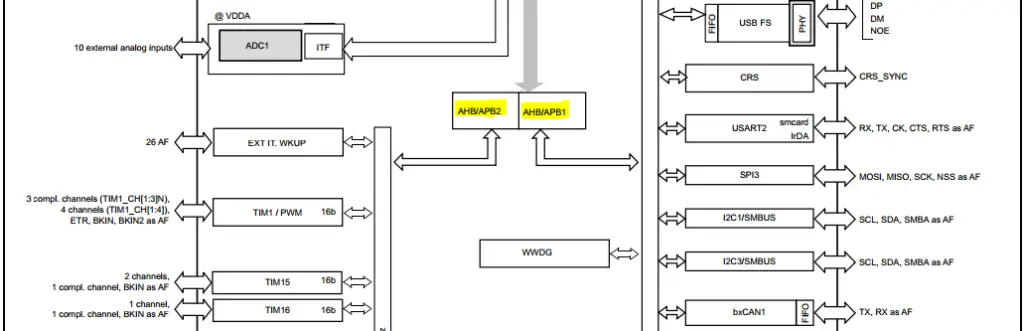
The two AHB/APB bridges provide full synchronous connections between the AHB and the two APB buses, allowing flexible selection of the peripheral frequency. address mapping of the peripherals connected to this bridge.
After each device reset, all peripheral clocks are disabled (except for the SRAM1/2 and Flash memory interface). Before using a peripheral you have to enable its clock in the RCC_AHBxENR and the RCC_APBxENR registers.
Memory MAP
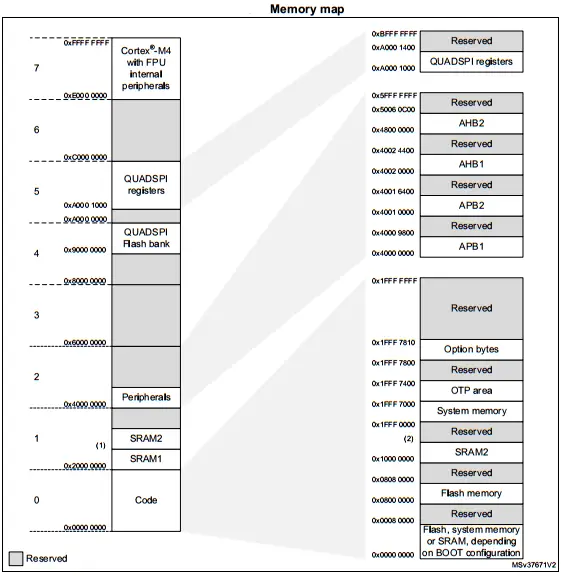
Resect and Clock Control (RCC)
Resect and Clock Control (RCC) Circuitry is our next topic. Let’s just start with the reset circuitry and its functionality. There are three types of reset, defined as system reset, power reset, and backup domain reset.
A Power Reset is generated when one of the following events occurs:
A System Reset sets all registers to their reset values unless specified otherwise in the register description. The reset source can be identified by checking the reset flags in the Control/Status register, RCC_CSR. A system reset is generated when one of the following events occurs:
The Software Reset: The SYSRESETREQ bit in Cortex®-M4 Application Interrupt and Reset Control Register must be set to force a software reset on the device.
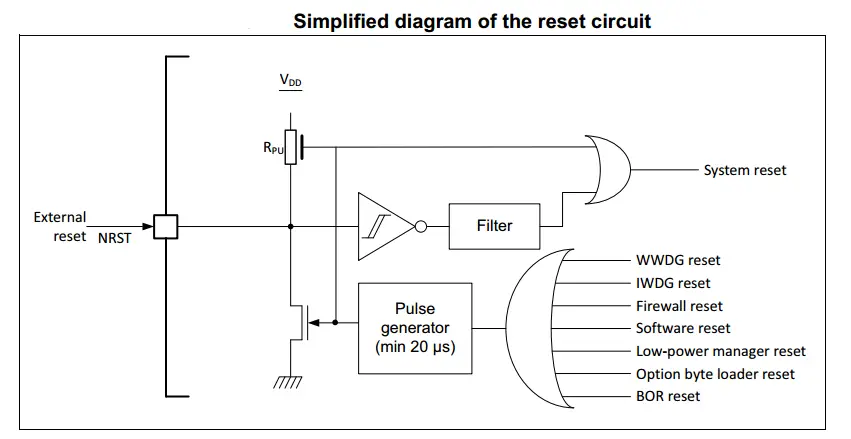
The Backup Domain Reset has two specific reset signals. A backup domain reset is generated when one of the following events occurs:
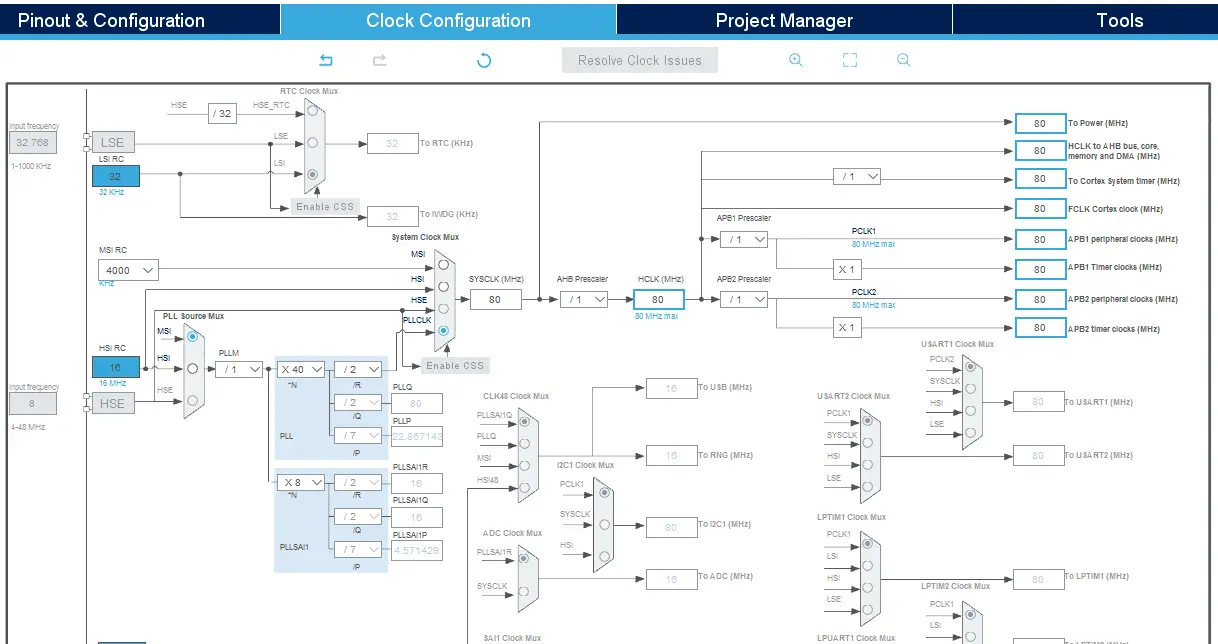
Clock Tree
Four different clock sources can be used to drive the system clock (SYSCLK):
The MSI is used as system clock source after startup from Reset, configured at 4 MHz.
The devices have the following additional clock sources:
Each clock source can be switched on or off independently when it is not used, to optimize power consumption.
We’ll be using CubeMX in the step of configuring the clock tree. Where we can set the desired SYSCLK speed (up to 80MHz for L432KC or up to 72MHz for F103C8). And we can also set the clock speed for the different peripherals, buses, and the USB hardware as well.
And that’s it for this tutorial. In the next one, we’ll get a closer look at the LL + HAL libraries that we’ll be using later on by configuring the CubeMX software tool. Afterward, we shall start getting into the hardware peripherals and starts doing some practical LAB examples.
Copyright ©2025. All Rights Reserved Emblab THE RAVE INNOVATION
